
How to Reactivate Old Customers with ChatGPT and WhatsApp
A free, step-by-step system to turn past WhatsApp conversations into personalized reactivation messages, and the foundation of a lightweight customer memory.
ButterflyCopilot
Most business owners chase new leads while their best buyers go quiet.
That is expensive. Past customers already trust you, already paid you, and already know how you work. Reactivating them is almost always cheaper and faster than acquiring someone cold. The problem is not willingness. The problem is memory: who bought last, what they ordered, what they cared about, and how long it has been since you last spoke.
You do not need a CRM rebuild to fix that. With WhatsApp chat exports and a ChatGPT Project, you can build a practical customer memory in an afternoon, then generate personalized reactivation messages with one clickable WhatsApp link each.
What you need: WhatsApp chats from customers you have already closed, and ChatGPT (Projects). That is it.
Why past customers respond better
Cold outreach fights for attention. Reactivation starts with familiarity.
A message that references a real past conversation ("you asked about coverage while you were traveling," or "last time you ordered X") does not feel like spam. It feels like a human follow-up. AI helps here not by inventing clever copy, but by reading history you already have and turning it into something you can send quickly.
Used well, this workflow does three jobs at once:
- Rebuilds a searchable record of who bought and what was discussed
- Surfaces customers who have gone quiet long enough to re-engage
- Drafts personal messages that sound like you, not a blast campaign
Step 1: Export every closed WhatsApp chat
After you finish a sale or service, export the chat. Do it while the conversation is fresh so your archive stays complete.
Open the customer chat → tap the three dots → More → Export chat. Choose Without media so you get a clean text file instead of a heavy zip of photos and videos.
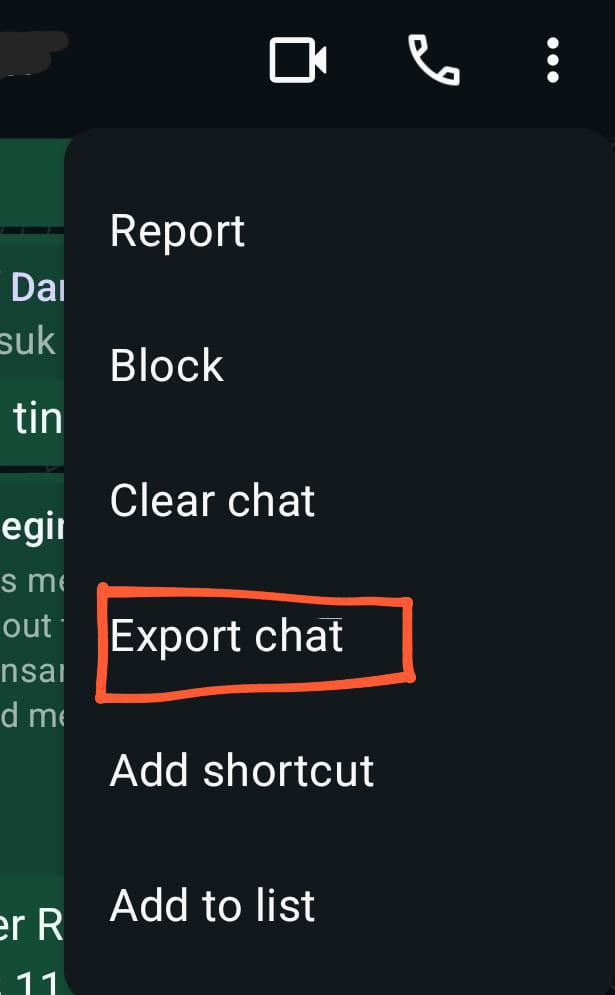
Rename the file using a consistent pattern such as Name-PhoneNumber.txt. Example:

Keep everything in one folder. Start with two or three recently closed customers, then make exporting part of your close ritual. Over time that folder becomes the raw material for your customer database.
Tip: Put the phone number in international format in the filename (for example 6012…). You will need it later for WhatsApp click-to-chat links.
Step 2: Turn ChatGPT Projects into a customer database
Create a ChatGPT Project and name it something simple like customer.
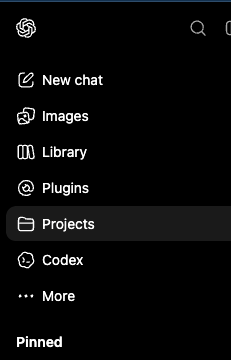
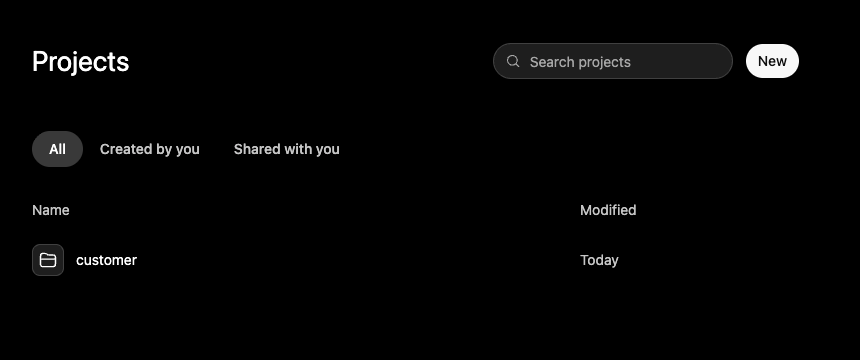
Open the project, go to Sources, and Add sources. Upload the .txt exports, not screenshots, not PDFs of chats. Text is what the model can search and quote reliably.
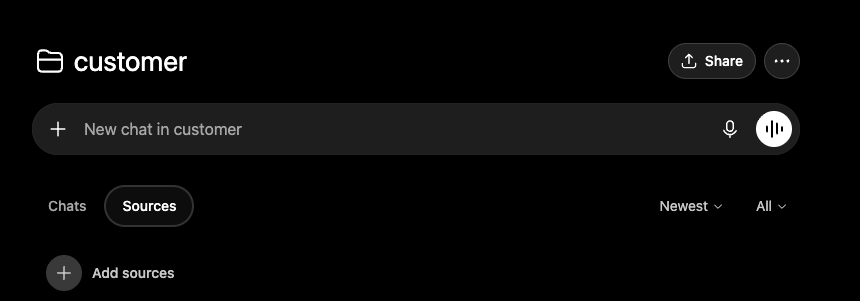
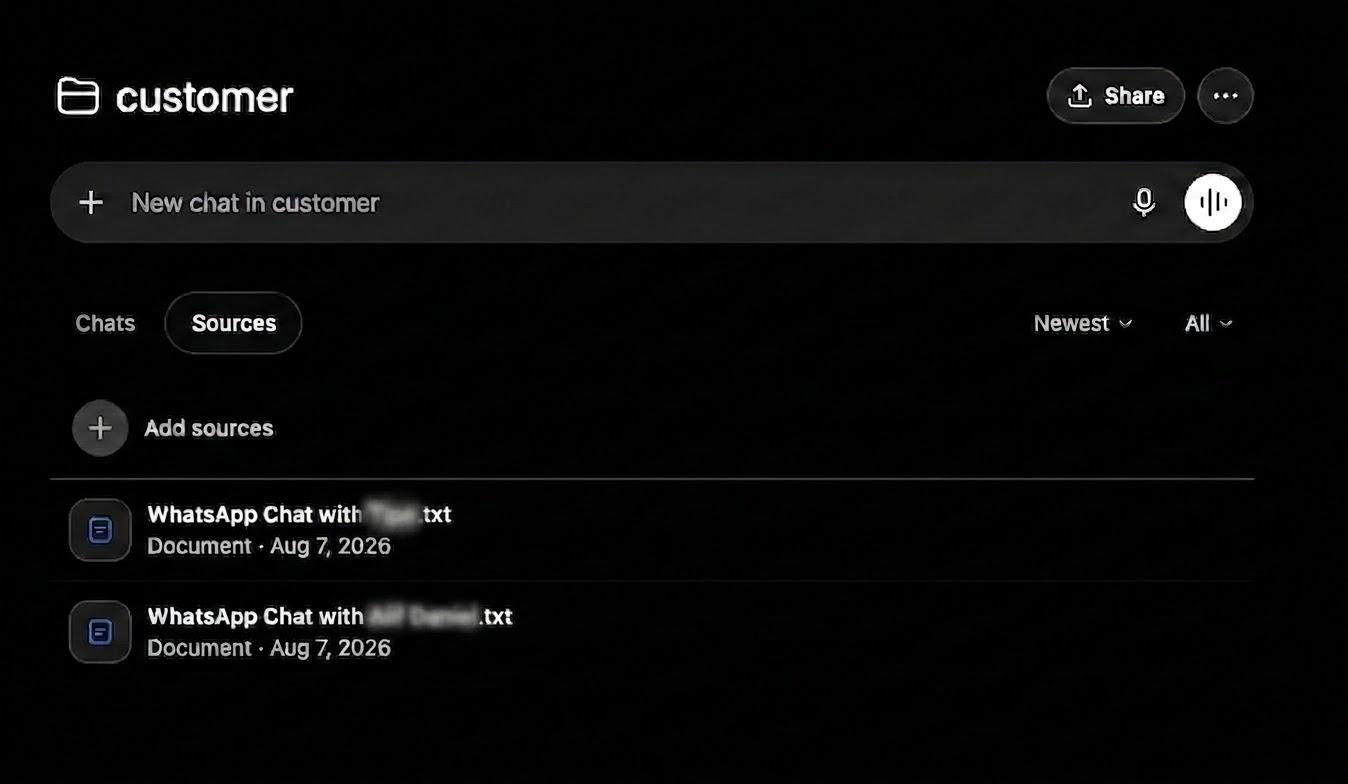
Repeat this for every customer you close. Eventually the project stops being “a few files” and becomes a living customer memory you can query in plain language:
- What did this customer order last time?
- What price or package did we discuss?
- Who has been quiet for more than three months?
- What objections keep coming up before a deal stalls?
That alone is useful even before you send a single reactivation message. You stop digging through old chats on your phone and start asking the archive.
Step 3: Generate personalized WhatsApp reactivation URLs
Once the sources are loaded, ask ChatGPT to build a reactivation campaign: short messages grounded in real history, plus unique wa.me links with the message already encoded.
Only contact people who have been inactive long enough. A simple rule works well: if today minus last interaction is less than your threshold (for example three months), skip them. Reactivation is for quiet customers, not people you messaged yesterday.
Prompt you can copy
Paste this into the project chat. Replace the bracketed fields with your own values.
Based on my existing customer records, create a customer reactivation WhatsApp
message and unique WhatsApp URL.

Reactivation Rule
This is a customer reactivation campaign.
ONLY contact customers whose last interaction with me was at least [X TIME AGO].
For example, if [X TIME AGO] is 3 months, only include customers where:
Today − Last Interaction Date ≥ 3 months
Do NOT contact customers whose last interaction was less than [X TIME AGO] ago.
Use the customer's most recent interaction/conversation date to determine whether they qualify.

Customer Information
- The customer's name and phone number are stored in the filename.
- Review their previous information and conversations.
- Use relevant details from our past conversations to make the message personal.

WhatsApp Message
Write a short, friendly, natural message to reconnect with the customer and introduce:
Product: [PUT YOUR PRODUCT HERE]
Discount/Offer: [PUT DISCOUNT HERE]
If there is no discount or offer, remove that part completely.

The message should:
- Feel like a genuine personal follow-up.
- Acknowledge that it has been a while since we last spoke when appropriate.
- Reference our previous conversation when relevant.
- Be interesting and friendly, not like a mass marketing message.
- Avoid aggressive sales language.
- End with a simple reason for the customer to reply.
- Never invent information or previous conversations.

WhatsApp URL
Create a unique WhatsApp click-to-chat URL:
https://wa.me/PHONE_NUMBER?text=ENCODED_MESSAGE
Make sure the phone number is in international format and the message is properly URL-encoded.

Output
Only include customers who meet the [X TIME AGO] reactivation requirement.
For each eligible customer:
Name:
[Customer Name]
Phone:
[Phone Number]
Last Interaction:
[Date]
Message:
[Personalized WhatsApp message]
WhatsApp URL:
[Unique WhatsApp URL]
What you should get back is not one generic blast. It is one message per eligible customer, each tied to something real from their history, and a link that opens WhatsApp with that message ready to send.
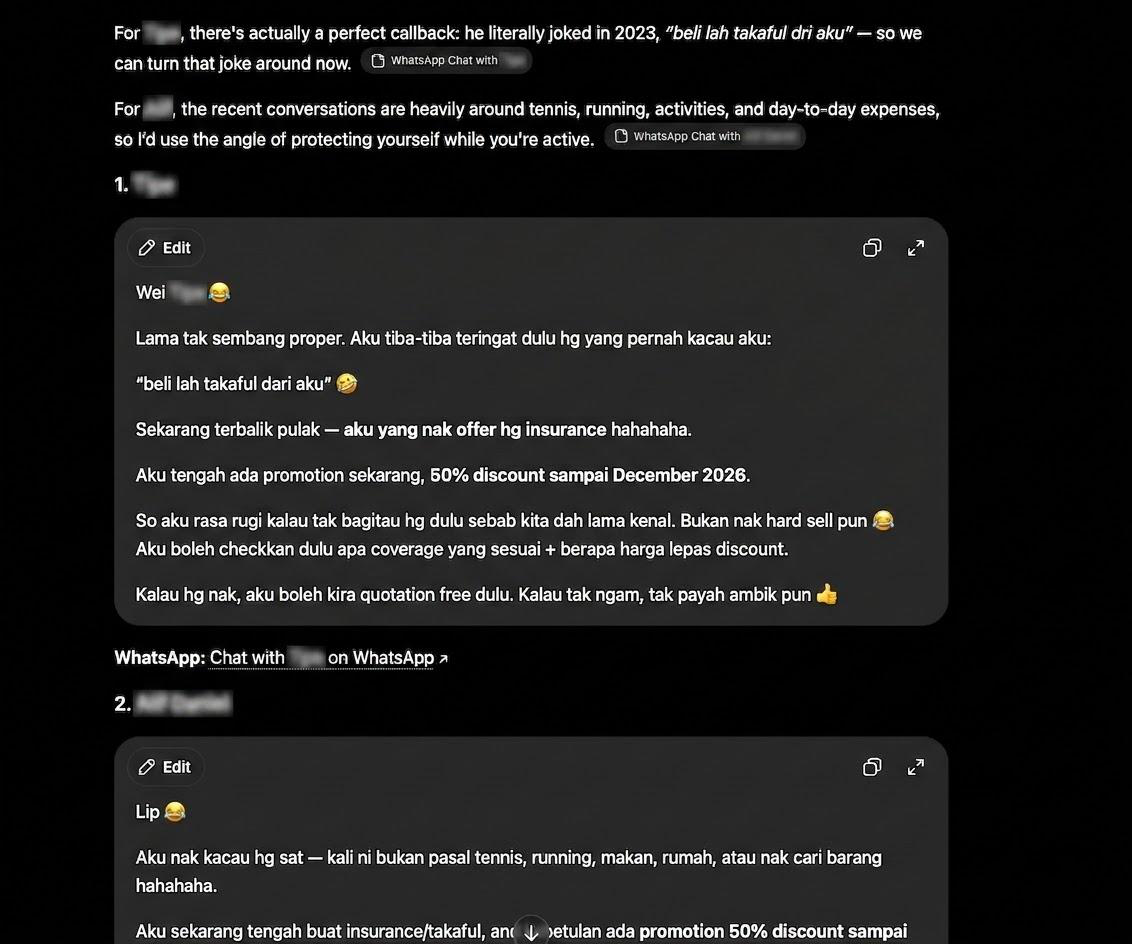
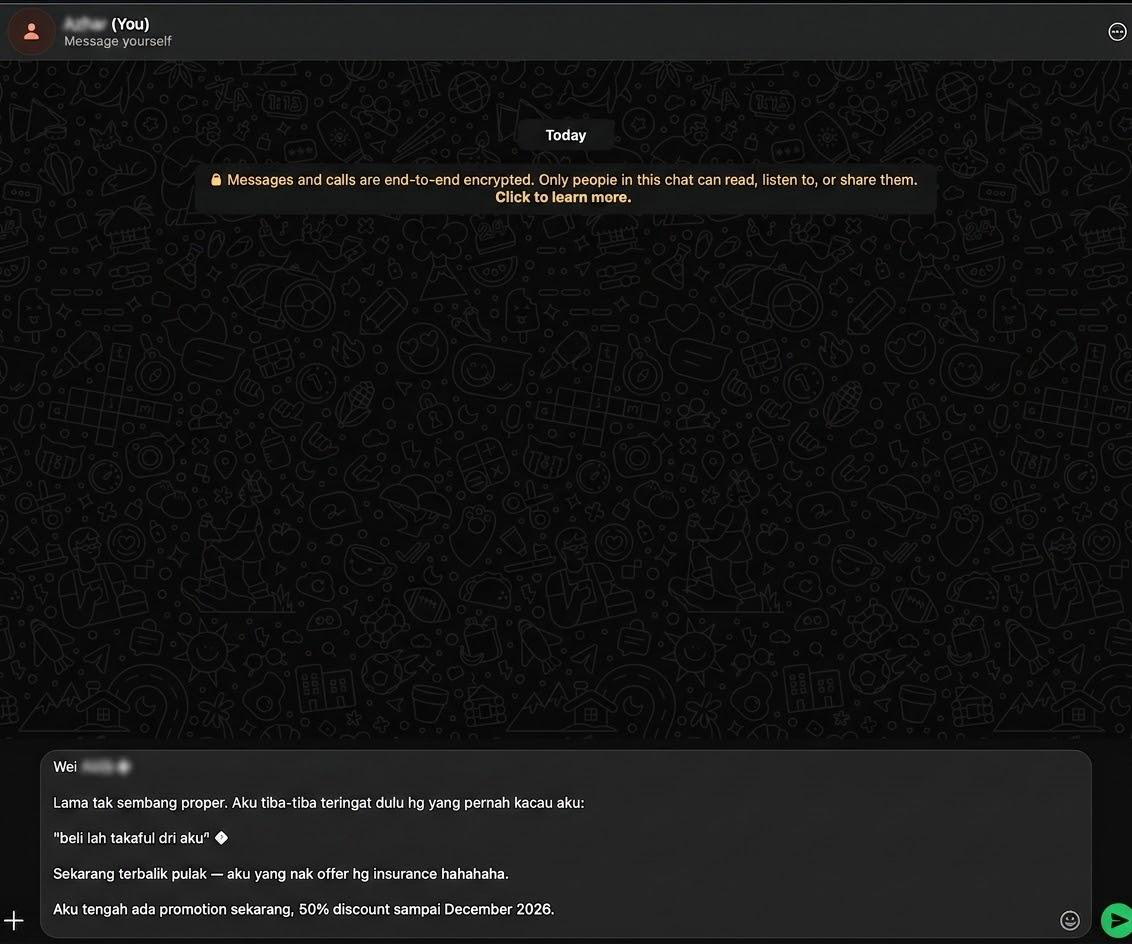
Click the URL, review the draft, and send. The point is speed with judgment: AI drafts from memory; you decide what goes out.
Expand the same system beyond reactivation
Reactivation is the obvious first win. The same archive unlocks more:
Lost-deal autopsy. Ask why conversations stall. Look for repeated objections, unclear pricing, slow replies, or missing next steps.
Offer design. Mine what customers actually ask for (timing, budget, packages, concerns) and shape promotions around demand instead of guessing.
Sales coaching. Compare closed wins with near-misses. What language worked? Where did tone slip into pressure? Which questions unlocked trust?
Handoffs. When a teammate takes over an account, they can query history instead of starting from zero.
Quiet pipeline hygiene. Run the inactivity rule weekly so reactivation becomes a habit, not a once-a-year scramble.
In other words: export once, reuse many times. The chats are already your richest CRM notes. Most teams just never put them where AI can use them.
Manual AI vs agentic AI
This guide is intentionally manual. You export, upload, prompt, review, and click. It is free, fast to start, and teaches the discipline of keeping conversation history.
What it is not yet is agentic. Nothing watches your inbox for you, nothing enforces the inactivity rule on a schedule, and nothing syncs closed deals into a shared system of record across a team.
That is the line between a clever workflow and an operating system. ButterflyCopilot is built for the second path: connect the systems where customer truth already lives, deploy agents that can act with guardrails, and give sales and leadership a shared view of who to re-engage, and why, without copy-pasting chats into a project every Friday.
Want more AI hacks and tricks like this? Join our newsletter below so you do not miss the next playbook.
Want agentic AI that does this for you automatically? WhatsApp me and we will walk you through it.
Quick checklist
- Export closed WhatsApp chats without media
- Rename files as
Name-PhoneNumber.txt - Create a ChatGPT Project and add the
.txtsources - Prompt for reactivation messages only for customers past your inactivity window
- Click each
wa.melink, review, and send - Keep uploading every new closed chat so the memory compounds
Past customers are not lost. They are waiting for a message that proves you still remember them.