
What Westpac Is Actually Doing With AI — And How Your Business Can Copy It
A major bank’s AI program looks enormous. The useful part is a pattern a smaller business can copy without 35,000 employees or 285 systems.
ButterflyCopilot
0110
Westpac has been investing heavily in AI.
But the interesting part isn't that a major bank has an NVIDIA-powered AI infrastructure, Microsoft Copilot across its workforce, or hundreds of technology systems.
The interesting part is how Westpac is applying AI to real business processes.
And the good news is that the underlying approach doesn't require 35,000 employees or 285 systems.
A small or mid-sized business can apply the same principles at a much smaller scale.
This article breaks it into two parts:
Part 1: What Westpac is actually doing.
Part 2: How another business can implement the same approach.
Part 1 — What Westpac Is Actually Doing
Westpac's September 2026 Data, Digital and AI update gives a much clearer picture of its AI strategy.
At a high level, Westpac is doing three things:
- Giving employees AI tools.
- Building specialised AI agents for specific operational processes.
- Building the data infrastructure that allows those AI systems to work reliably at scale.
1. AI for the workforce
Westpac is rolling out Microsoft 365 Copilot across its workforce of around 35,000 employees, following an earlier pilot involving 15,000 employees.
The idea is straightforward:
Give employees an AI assistant that helps them do their existing jobs faster.
Westpac has also introduced training, AI education and environments such as Copilot Studio so teams can create custom agents and automate workflows.
This is the "AI for everyone" layer.
It isn't about replacing every employee with an AI agent.
It is about giving employees an AI capability inside the work they already perform.
Westpac itself says the strongest impact comes from combining technology with skilled people and good judgement.
2. Specialised AI agents
This is where things get more interesting.
Westpac has also been deploying specialised AI agents into operational processes.
Instead of asking:
"How can we make one AI that runs the entire bank?"
the approach is closer to:
"What specific piece of work is currently being performed by people that AI can reliably assist with?"
For example, Westpac has used AI agents around lending-related processes involving documents such as payslips and bank statements.
The agent can process information, perform checks and prepare results for the human employee.
The important thing is that these are narrow agents with specific responsibilities.
They aren't supposed to independently run the entire process.
The pattern looks more like this:
Document arrives
       ↓
AI reads it
       ↓
AI extracts information
       ↓
AI checks the information
       ↓
AI applies relevant rules
       ↓
AI produces a result
       ↓
Human reviews / decides
That's a much more practical use of AI than simply giving an employee a chatbot.
Westpac has reported that its five operational AI agents could remove around 250,000 manual activities and provide approximately 150,000 banker hours of capacity annually. These are Westpac's reported estimates rather than independently audited figures.
3. The massive data problem
This is the part most businesses shouldn't copy.
Westpac has approximately 285 source systems.
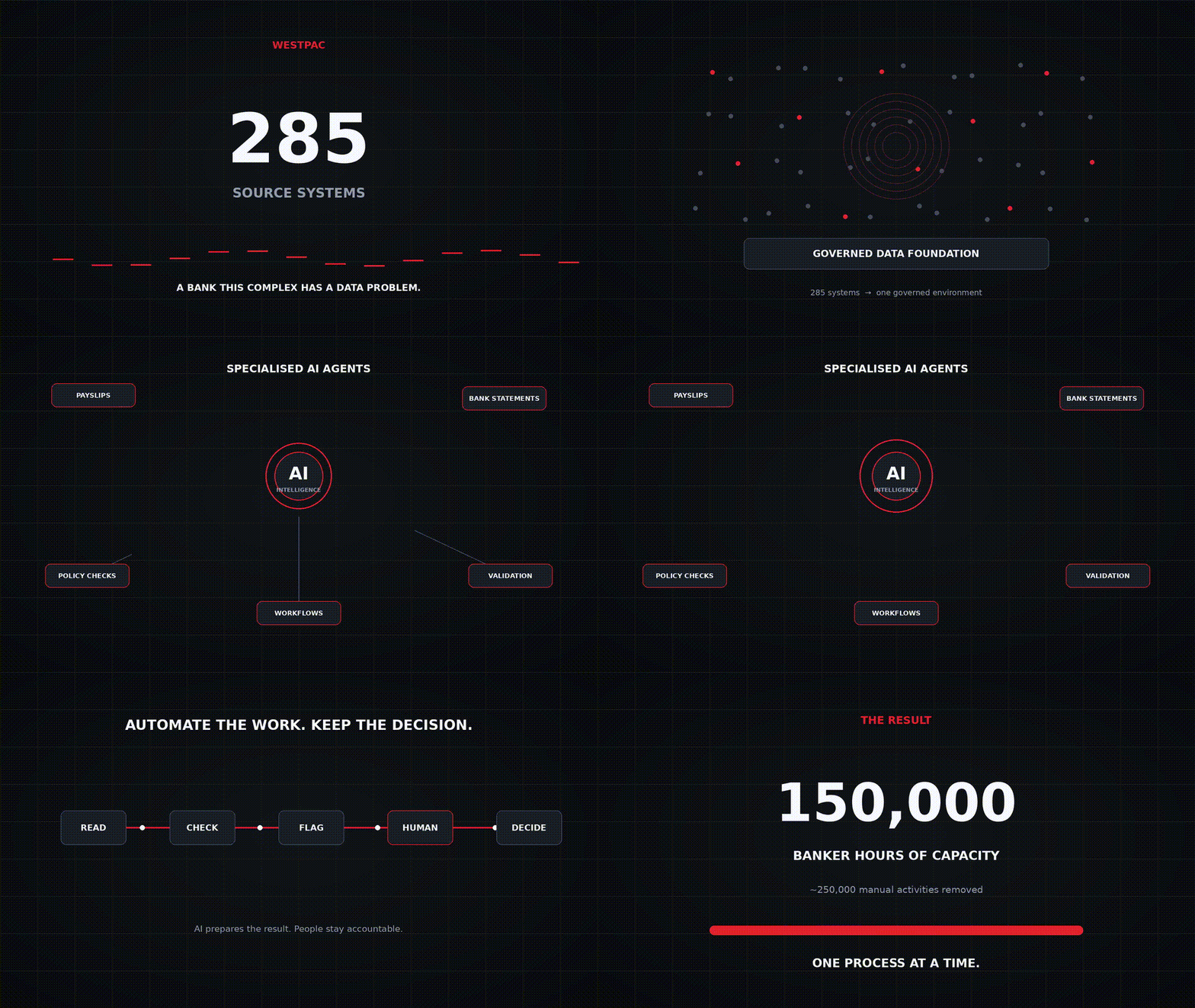
Westpac’s reported program: 285 source systems, specialised agents for work such as payslips and bank statements, and about 150,000 banker hours of capacity a year.
Those systems contain information about customers, products, transactions and operations.
Westpac therefore built an enterprise data platform called Adapt.
Adapt brings data from 285 source systems into a common governed environment on Microsoft Azure.
Westpac says the program involved migrating more than 1 petabyte of data and more than 14,000 data pipelines.
Why go through all this trouble?
Because AI is only useful if it can reliably access the information it needs.
Westpac describes the relationship roughly like this:
285 systems
     ↓
Adapt
     ↓
Governed / standardised data
     ↓
Westpac Intelligence
     ↓
AI models + agents
     ↓
Employees / customers
The data foundation allows Westpac to create a more complete view of its customers and run AI against that information.
For a bank of Westpac's scale, this infrastructure makes sense.
For a five-person business, it probably doesn't.
And that's an important distinction.
4. Westpac is also using AI to build software
Another particularly interesting example came from Westpac's AI engineering work.
Westpac's Chief AI Officer, Dan Jermyn, said the bank migrated its internal intranet using AI.
According to Jermyn, the project would typically cost "low seven figures" and take around a year.
Westpac reported completing it with approximately US$12,000 in AI token costs, equivalent to around A$16,880 at the figure reported.
That doesn't mean the entire project literally cost $12,000.
The figure refers specifically to AI token costs. There were still people, engineering processes, infrastructure and other costs around the project.
But it demonstrates something important:
AI can dramatically change the economics and speed of certain knowledge-work tasks.
So what is Westpac's actual AI model?
Strip away the corporate terminology and it becomes surprisingly simple.
Westpac is essentially doing this:
PEOPLE
AI helps employees do their existing work
        +
PROCESSES
Narrow AI agents automate specific repetitive work
        +
DATA
A governed data foundation makes information accessible
        +
HUMANS
People remain responsible for important decisions
The important word here is specific.
Westpac isn't simply saying:
"Put AI everywhere."
It is identifying specific areas where AI can remove friction.
Part 2 — How Another Business Can Implement This
Now comes the more useful question.
What if you're running a:
- manufacturing company
- accounting firm
- construction company
- service business
- distributor
- agency
- retailer
- professional practice
You probably don't have 285 systems.
You might have five.
WhatsApp
Excel
Xero
Google Drive
CRM
You don't need to build Westpac's Adapt.
You need to copy the logic, not the infrastructure.
Step 1 — Don't start with AI
Start with a business process.
Ask:
"What does someone in this business repeatedly check, copy, prepare, update or chase?"
For example:
Accounting firm
Every morning someone checks multiple inboxes.
Construction company
Someone checks whether suppliers have submitted the required documents.
Distributor
Someone checks incoming orders and updates the internal system.
Service company
Someone checks WhatsApp messages and manually updates job status.
Finance team
Someone checks invoices against purchase orders.
These are much better AI opportunities than:
"Let's build an AI employee."
Step 2 — Map the workflow
Take one repetitive process and write down every step.
For example:
Customer sends WhatsApp message
        ↓
Employee reads message
        ↓
Employee identifies the job
        ↓
Employee checks spreadsheet
        ↓
Employee checks previous messages
        ↓
Employee updates job status
        ↓
Employee informs customer
Now ask:
Which of these steps actually requires human judgement?
You might discover that most of the process is repetitive.
Step 3 — Separate work from decisions
This is one of the most important ideas from the Westpac approach.
Not everything should be automated.
Separate the workflow into:
AI can do
- read
- extract
- classify
- compare
- summarise
- check
- flag
- draft
- update
- notify
Human should decide
- approve
- reject
- negotiate
- spend money
- make an exception
- handle unusual situations
- make high-impact decisions
For example:
Invoice
   ↓
AI reads invoice
   ↓
AI compares against PO
   ↓
AI finds mismatch
   ↓
AI explains mismatch
   ↓
Human decides
You don't need an autonomous finance department.
You need an AI system that gets the boring work out of the way.
Step 4 — Connect only the systems you actually need
Suppose the workflow involves:
WhatsApp
Google Sheets
Google Drive
Connect those three.
Don't build a giant company-wide data platform.
Your architecture might simply be:
WhatsApp ──────┐
               │
Google Sheets ─┼──→ AI workflow ──→ Human
               │
Google Drive ──┘
If the workflow later requires Xero, connect Xero.
If it requires a CRM, connect the CRM.
The architecture grows because the business needs it, not because you decided to build an AI platform first.
Step 5 — Give the AI one job
This is where many AI projects go wrong.
Don't create:
"Business AI Agent"
Create:
"Invoice Checking Agent"
or:
"Daily Job Status Agent"
or:
"Customer Follow-up Agent"
or:
"Lead Qualification Agent"
or:
"Document Verification Agent"
The narrower the initial responsibility, the easier it is to test whether the system actually works.
Step 6 — Start with a human-in-the-loop
Don't immediately let the AI take irreversible actions.
Start with:
AI
 ↓
Check
 ↓
Recommend
 ↓
Human approves
 ↓
Action
Once you understand the failure modes, you can gradually automate more.
For example:
Version 1
AI finds overdue jobs.
Human sends the message.
Version 2
AI drafts the message.
Human approves.
Version 3
AI automatically sends messages for approved situations.
Version 4
AI handles the entire workflow except unusual cases.
That's a much safer path to automation.
Step 7 — Measure the result
Don't measure:
"We have an AI agent."
Measure:
- hours saved
- response time
- errors reduced
- tasks completed
- revenue generated
- costs avoided
- customer response time
- number of manual steps removed
For example:
Before:
30 invoices × 5 minutes = 150 minutes
After:
AI processes everything → employee reviews exceptions in 25 minutes
You have a measurable result:
150 minutes → 25 minutes
That's the value of AI.
Not the number of agents.
The Westpac strategy in SME form
You can reduce Westpac's enormous architecture into a simple SME playbook:
WESTPAC

285 systems
      ↓
Enterprise data platform
      ↓
AI / intelligence
      ↓
Specialised agents
      ↓
Employees
Becomes:
SME

5 systems
      ↓
Connect relevant information
      ↓
AI workflow
      ↓
One specialised agent
      ↓
Employee
The infrastructure is different.
The operating principle is the same.
The real lesson
The biggest mistake businesses can make with AI is starting with the technology.
They ask:
"Which AI tool should we buy?"
A better question is:
"Where is someone repeatedly spending time reading, checking, copying, preparing or chasing information?"
Find that process.
Map it.
Separate the repetitive work from the human decision.
Connect the systems involved.
Give AI one narrow responsibility.
Keep a human involved.
Measure the result.
Then repeat.
ONE PROBLEM
     ↓
ONE WORKFLOW
     ↓
ONE AI AGENT
     ↓
ONE MEASURABLE RESULT
     ↓
NEXT WORKFLOW
     ↓
NEXT AGENT
That's how a small business can start building its own AI operating system.
You don't need Westpac's 285 systems.
You don't need an AI factory.
You don't need a massive data team.
You need one business problem worth automating.